 集酷商户平台
用户取消订单操作指南
2021-03-19
未付款订单取消
Q:How do I cancel an unpaid order?
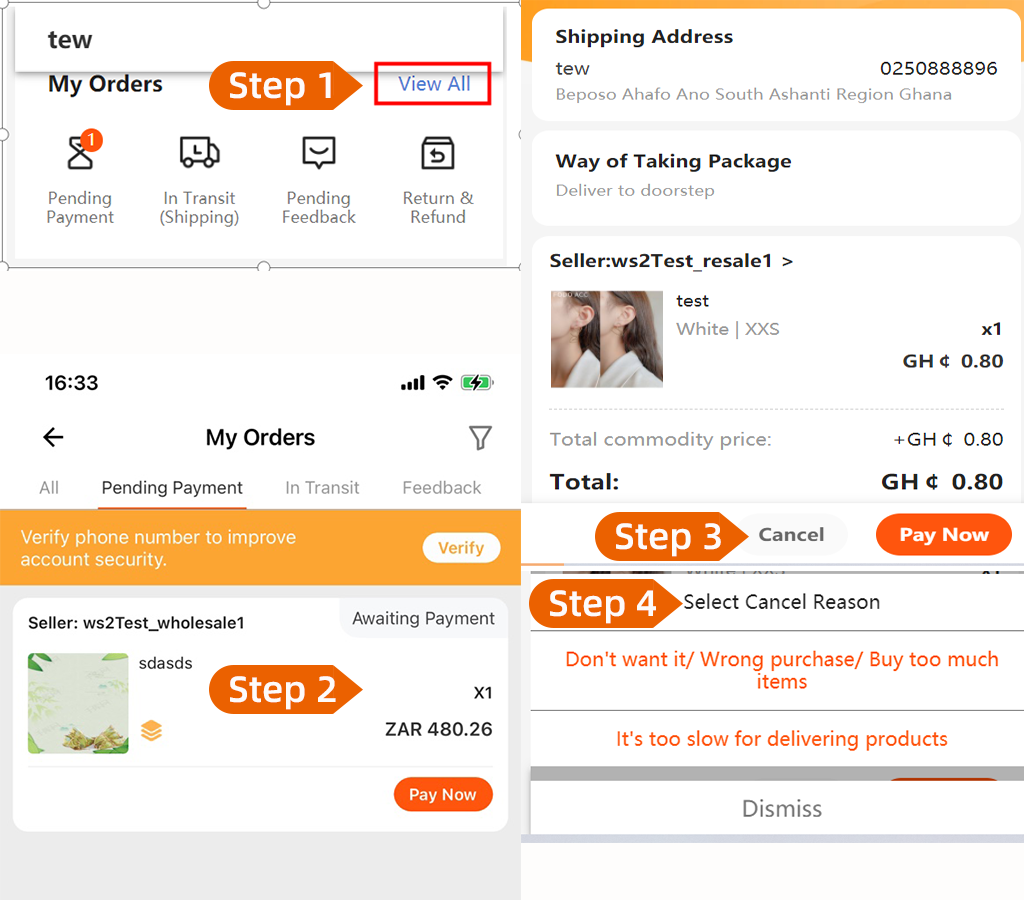
A:Step 1:Dear customer, please open our KiKUU App and click ”My KiKUU” section
The page will jump automatically to your information page
Step 2:Click on the ”Pending Payment” is shown as below ”My Orders” option
Step 3:Select and click on the awaiting payment order
Step 4:Click ”CANCEL” and select the cancellation reason then the order will be cancelled
(Don't want it/Wrong purchase/Buy too much items)
(It’s too slow for delivering products)
Thank you for shopping on KiKUU
已付款订单取消
Q:How can I cancel my order if have paid?
A:Let the customer provide the order number and check the order status
If the status is showing “Awaiting Shipment” (the order can be cancelled)
Step 1: Dear customer, please open our KiKUU App and click ”My KiKUU” section
The page will jump automatically to your information page
Step 2: Click “My Order” and select the order which you want be cancelled
Step 3: Select the cancel reason then order will be cancelled
(Don't want it/Wrong purchase/Buy too much items)
(It’s too slow for delivering products)
Step 4: The money will refund to you automatically by our system if you pay via Online or K-Pay payment.
If the status is showing “Processing” (the order can’t be cancelled)
Dear customer, your order status is showing ”Processing”, that means your order is have
processed and get ready shipping to here. So you can’t cancelled your order under the status is
showing ”Processing”
Thank you for shopping on KiKUU.

入驻咨询

微信扫一扫关注

App下载

Android

iOS